
Aragon Maestro’s latest update introduces Sound Event Detection (SED). This is a sophisticated feature that enables real-time monitoring and classification of various acoustic events in the home environment. YAMNet neural network technology catagorises sounds into Alert, Human, Household, and Animal categories.
Sound Event Detection Overview

The Sound Event Detection (SED) feature in Aragon Maestro 2.1.0 processes audio streams from Aragon Satellites using UDP protocol, analyzing them for both wake words and sound events. This system employs YAMNet for sound classification, which therefore enables real-time detection and categorization of various acoustic events in the home environment. While the Maestro can handle multiple satellites simultaneously, it is recommended to configure only one satellite for SED during the initial deployment phase. To utilize SED, the satellite’s wake word system must be set to ‘Centralized’. This therefore allows the Maestro to manage wake word detection and enabling audio streaming for sound event analysis.
Configuring Sound Event Detection in Maestro

To set up SED in Aragon Maestro, follow these steps:
- Update the system to Aragon Maestro version 2.1.0 and Wakeword (Central) to version 1.1.1 from the Maestro About page
- Select the desired satellite and set its Wakeword system to ‘Centralized’
- Save the configuration
- Enable SED through the “Step 5. Configure ‘Sound Events'” dialog
- Access the SED user interface at MAESTRO-IP:1880/dashboard/all
For optimal performance in this early release, we recommend that only one satellite should be configured for Sound Event Detection. The ‘Centralized’ Wakeword setting is crucial as it allows the Maestro to handle wake word detection and enables audio streaming for SED functionality.
Monitoring Interface Features
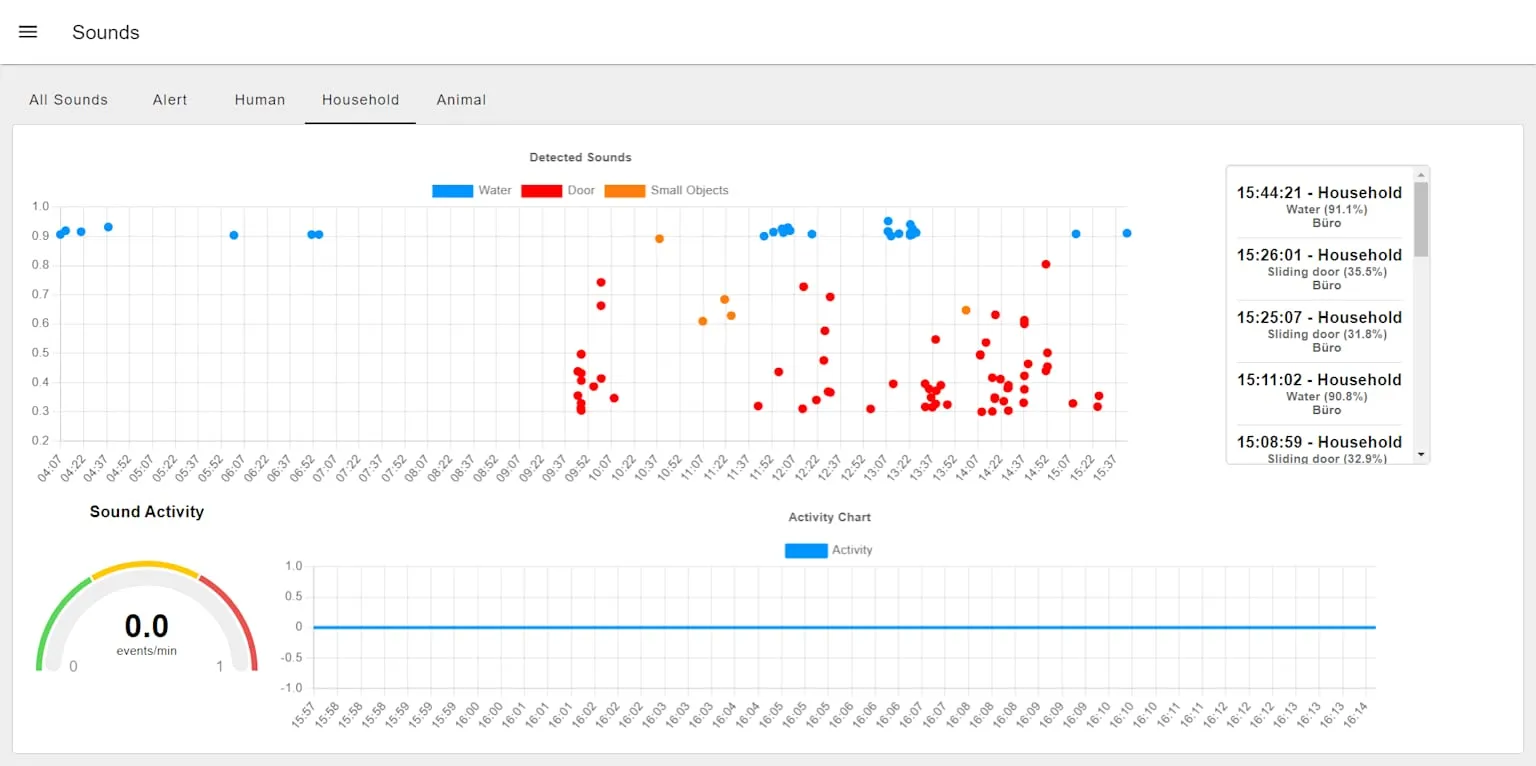
The SED monitoring interface is accessible at MAESTRO-IP:1880/dashboard/all. It offers a comprehensive view of detected sound events through five tabs: All Sounds, Alert, Human, Household, and Animal.
Each tab features:
- A time chart with color-coded dots representing detected sounds by category
- A Sound Event Gauge displaying instant detection values
- A Sound Activity time chart for temporal visualization
- A Sound Event list showing the latest events in text format
The ‘All Sounds’ tab provides an overview of all categories, while the other tabs offer detailed information specific to each sound type. This intuitive interface allows users to easily monitor and analyze various acoustic events in their environment, enhancing the overall functionality of the Aragon Maestro system.
Sound Categories and Notifications
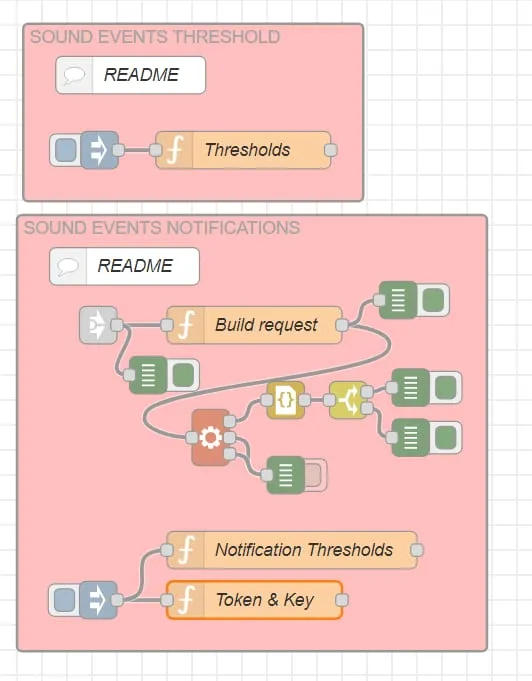
The SED system categorizes sounds into four main groups: Alert, Human, Household, and Animal, each with specific detection thresholds and aliases. For instance, Alert sounds include alarms and glass breaking, while Human sounds encompass speech and physical noises. Users can configure custom notifications through Node-RED, integrating with pushover.net for remote alerts. In addition, for off-site monitoring, Tailscale VPN enables secure connections to the Maestro, allowing users to access the SED dashboard and examine detailed sound event charts from anywhere. This comprehensive approach ensures users stay informed about significant acoustic events in their environment, even when away from home.